hrpower
HR Power
HR Power RESTful API
The RESTful API is divided in two groups:
user
entry
The API provides the communication means to access the HRPower system.
Once authentication is done, all functions require a OAuth 2 access token in the header of the HTTP connection
All times are in UTC in the system.
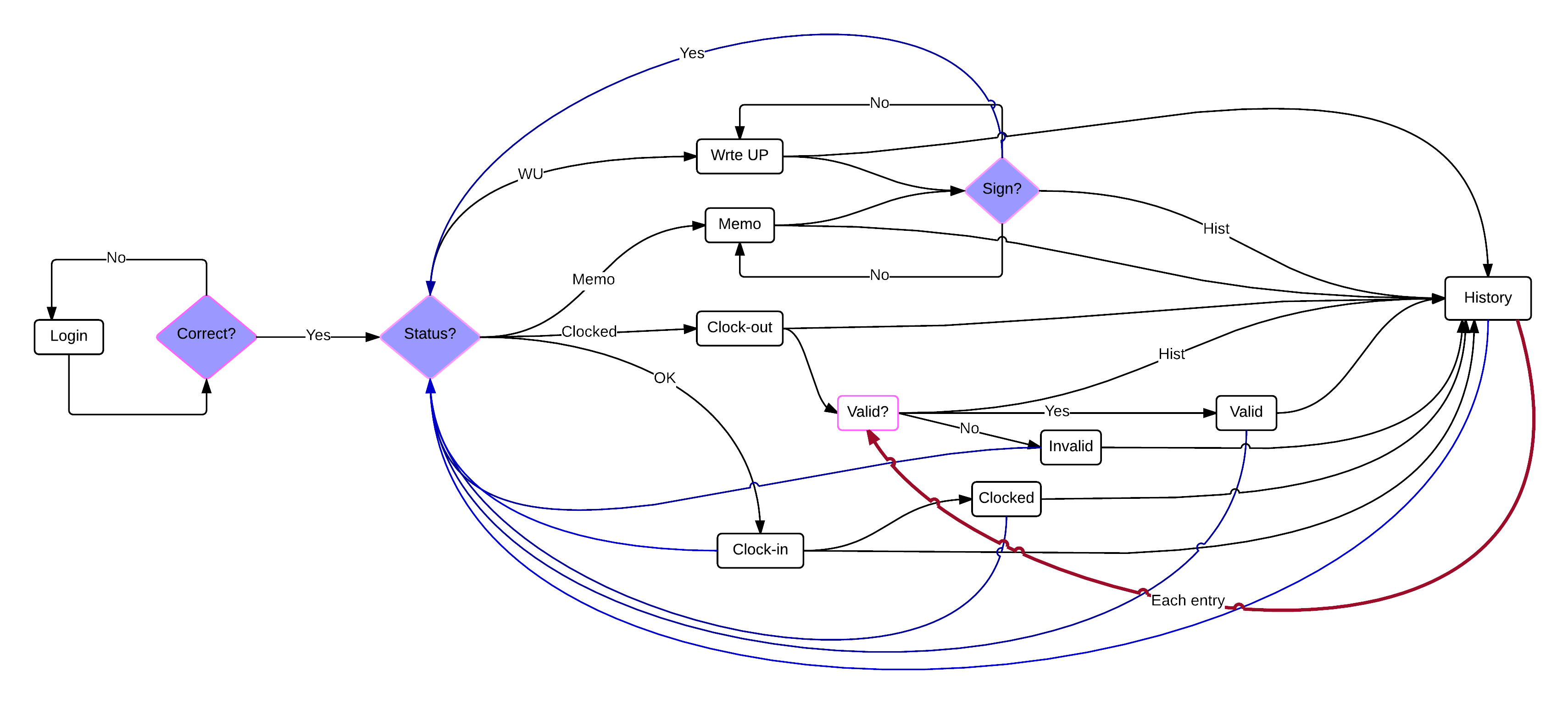
App - flow of views
Login
The user will get fields to enter his userid and password. Once authenticated, the user will be able to use the app without having to login again, until he/she performs an explicit logout action. If there is any authentication problem, the system will notify the user accordingly.
SetUp
Information about the user and parameter for the behaviour of the App (this is an internal stage and there is no view associated).
Clockin
If the user is in state to perform a clockin the system will present the information:
site name corresponding to the geolocation sent
username
and a button to execute the clockin action. If this action is successful or unsuccessful the system will notify the user accordingly. A persistent indication of the clockin time will be presented until clockout is given.
Clockout
If the user is in state to perform a clockout action, the system will present the same information as before but now a button to execute the clockout action.
If this action is unsuccessful the system will notify the user accordingly.
If the action was successful, the clock entry with the clockin time, clockout time and site name will be presented, plus buttons to approve or decline the entry.
History
If allowed, the user will be able to access the historic clock records. Each of these records can be toggled from approved to declined and back.
Write-ups and memorandums
If thre are any outstanding writeups or memorandums then they will be presented first, and the user will not be able to take any other action (except logout) until he/she signs (by means of the private password) the presented writeup.
GeoFencing
If configured in the setup stage, the app needs to verify if its geo-location data is within the cofigured site, by sending its location at configured periods of time. When the system detects that the user is outside the polygon, a notification has to be displayed in the app.
Notes
- Time needs to be displayed in US-Central timezone.
- app views are needed in bootstrap.